Collect on delivery NEW
>> Open Summer Cart admin panel
>> Go to Settings >> Modules >> Payment
>> Select 'Collect on delivery'
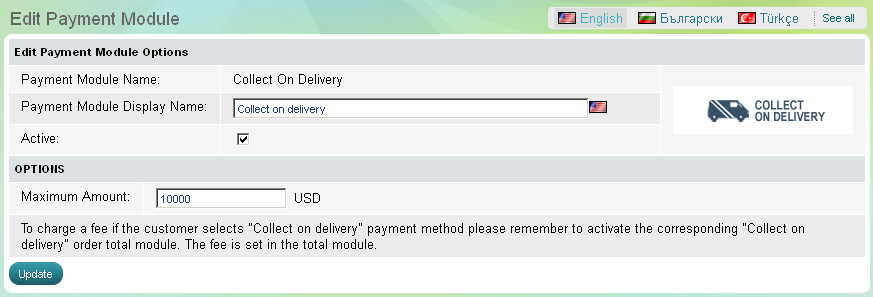
Collect on delivery payment enables customers to pay in cash when they receive the ordered products. The module for collect-on-delivery payments can be activated or paused in a click at any time. It has one setup option that need to be completed before its activation:
- Maximum amount, that can be paid through this method.
Enter additional information for your customers in "Customer Help" field. This information will be shown when customer choose Billing / Shipping Methods in the Checkout and in the One Page Checkout.
| Important: |
Remember that if you want to charge a fee to customers using "Collect on delivery" payments you need to go to Settings >> Modules >> Order Total and activate the corresponding "Collect on delivery" order total module. There you will be able to set up a fee. |
|---|
-
Код:AA-00994